4 Complex Algorithms
4.1 Overview
The CIDA module is integrated with the Combo Tool, a re-usable SAS macro that allows users to define events (i.e., exposures, outcomes of interest, and inclusion/exclusion criteria) using complex algorithms. The Combo Tool reduces the need for de novo programming each time a new algorithm is developed as part of a Sentinel workgroup or routine data query.
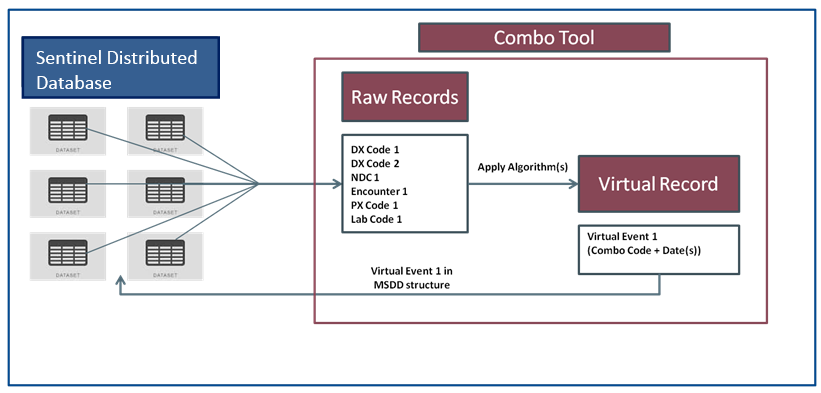
The process of creating single events from combinations of multiple Sentinel Distributed Database (SDD) variables and variable values is simple and flexible. The SAS macro processes multiple “raw” items used to determine a combination and creates a single “virtual” record that summarizes the combination in a fashion identical to raw SDD diagnosis, procedure, or dispensing records. Users of the tool determine how the final virtual record should behave; i.e., if the record should mimic a diagnosis, procedure, or dispensing record, and what date(s) virtual records are assigned. Figure 4.1 summarizes how the Combo Tool creates virtual events.
The Combo Tool can perform the following functions:
- Combine any NDCs, diagnoses, procedures, encounter types, enrollment episodes, lab values, and demographic criteria (using “and” and “or” joins)
- Use same-day, same-encounter, or time intervals to define events (e.g., diagnoses X and procedure Y within 2 weeks of each other)
- Let the user decide what “event date” is used on the virtual record for combinations that are defined with spans of more than one day
- Define a specific exposure length for any codes that comprise the combination (similar to days of supply or length of stay)
- Let the user have the ability to define the encounter type for the resulting virtual record
4.1.1 Eligibility Requirements
“The QRP allows for the specification of enrollment eligibility requirements—by default, all codes identified must occur during a valid enrollment span. Additionally, users can define the required number of days of continuous enrollment before an index date to determine eligibility for cohort inclusion. Unlike QRP, the Combo Tool creates virtual records without assessing whether the patient was enrolled at the time of each raw record of the combo. QRP will still only use virtual records that occur during a valid enrollment span. The user should include enrollment as part of the combo if enrollment is required for any component of the combo virtual record.
4.2 Stepwise Two-by-Two Method
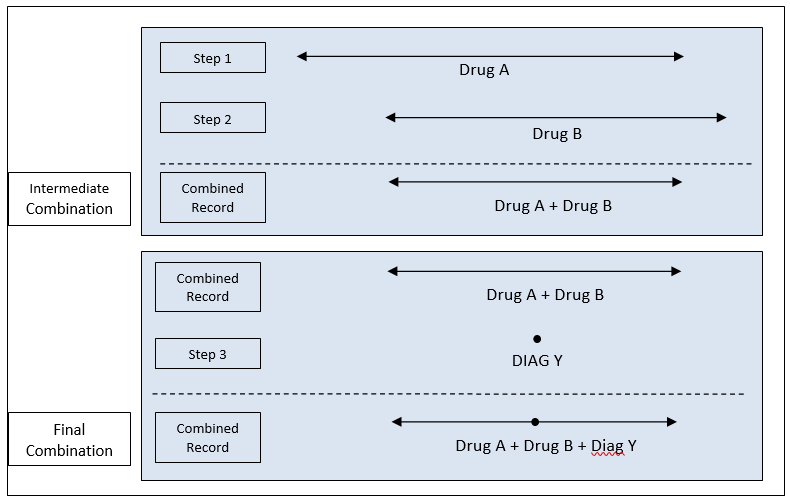
Combinations are created using a stepwise two-by-two method. This method consists of using the first two raw items to create an “intermediate” virtual combination record, and then combining the intermediate virtual record with the next raw combination item. This process is repeated until all combination items have been processed. The final virtual record will meet all the combination definition requirements. The final virtual record is then used “as-is” by programs designed to query the SDD. To better illustrate the method, consider the following combination scenario:
Suppose we need to identify subjects taking the combination therapy Drug A and Drug B and that have had an outcome of diagnosis DIAG Y over the course of the combination therapy. Figure 4.2 illustrates a valid case of the scenario.
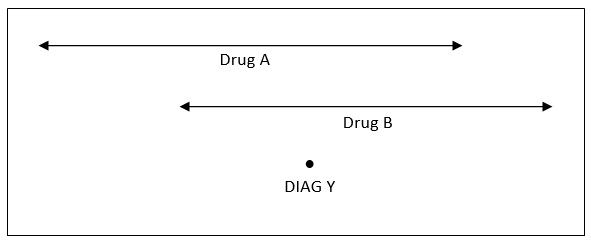
The ordered steps involved in creating the combination item include: 1. Identify Drug A treatment 2. Identify Drug B treatment overlapping Drug A treatment; create virtual combination record 3. Identify Diagnosis Y codes that overlap Step 2 virtual combination record
The stepwise two-by-two method will first process Steps 1 and 2 and create an intermediate virtual combination record. Then this intermediate virtual record will be used to complete Step 3. Figure 4.3 illustrates the algorithm.
4.3 Combining Items
In the SDD, there are essentially two types of “raw” items: one day events (e.g., diagnoses, procedures); and multiple day events (e.g., dispensing with days of supply > 1, inpatient stays, etc.). With these two types of raw items, a total of three types of combinations can be created:
- One Day <-> One Day
- One Day <-> Multiple Days
- Multiple Days <-> Multiple Days
4.3.1 One Day <-> One Day Combinations
This type of combination is the most straightforward. To be included in this category, records for the two sets of combination items must occur on the same day. The typical use for this type of combination is to combine diagnoses and procedures. For example, the user may want to identify patients with a depression diagnosis, but without a schizophrenia diagnosis on the same day, or identify patients with a diagnosis for hypertension coupled with a CT scan procedure on the same day. Figure 4.4 illustrates a one day <-> one day combination where the algorithm is identifying single events where X and Y occur on the same day.
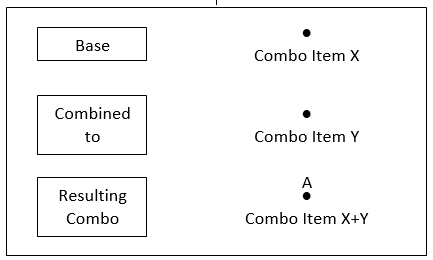
In this case, there is only one possibility for the virtual record event date, whish is the item X and item Y date (A).
4.3.2 One Day <-> Multiple Days Combinations
To be included in this category, one of the two combination items must be a single day event. The typical use for this type of combination is to combine diagnoses and procedures with drug use, inpatient stays, or eligibility episodes. For example, the user may want to identify members with liver transplant during a hospital stay or with a diagnosis for arrhythmia during the course of drug treatment. Figure 4.5 illustrates a one day <-> multiple day combination where the algorithm is combining multiple day item X with single date item Y.
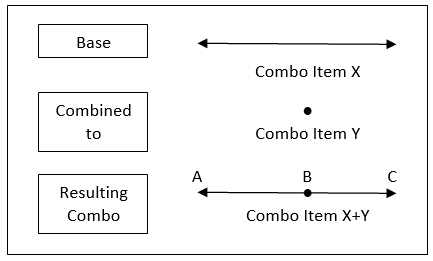
Contrary to the same day event category, one day <-> multiple days combinations have up to three choices for start date and end date for the final virtual record (A, B, or C).
4.3.3 Multiple Days <-> Multiple Days Combinations
This is the last but most general type of combination. To be included in this category, both combination items must span more than one day. The typical use for this type of combination is to combine several drug uses (combination therapy) and/or inpatient stays and/or eligibility spans. For example, the user may want to identify members with a hospital stay with evidence of at least two days of supply for a drug. Figure 4.6 illustrates a multiple day <-> multiple day combination where the algorithm is combining multiple day item X with multiple day item Y.
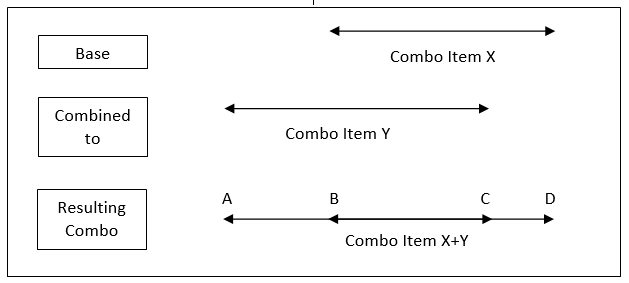
For this category, we have up to four choices for start date and end date for the final virtual record (A, B, C, or D).
4.4 Defining Virtual Record Date(s)
Because the virtual record can be the result of combining intervals, there are many possibilities to define start dates and end dates for intermediate and final virtual records.
For each intermediate or final combination processed (i.e., each time two items are combined), we define a “Base” record and a “Combined-to” record. The Base record always represents either the first or an intermediate combination item, while the “Combined-to” record always represents a raw item. Each time two combination items are processed, the user must determine which start and end date to retain for the combined record. If the Base + Combined-to combination is an intermediate combination, the dates selected will be carried forward for additional combination processing. If the combination is a final combination, the start and end dates will determine the dates used for the final virtual record. The following start and end date options are available:
- The start date of the Base interval
- The start date of the Combined-to interval
- The minimum date between the Base and Combined-to start date
- The maximum date between the Base and Combined-to start date
- The end date of the Base interval
- The end date of the Combined-to interval
- The minimum date between the Base and Combined-to end date
- The maximum date between the Base and Combined-to end date
- The start of the overlapping period between Base and Combined-to interval
- The end of the overlapping period between Base and Combined-to interval
4.4.1 Virtual Record Layout
Once dates are specified, the last step is to tell the Combo Tool how the final virtual record summarizing the combination should behave. This is important because the virtual combination record can then be used by any programs designed to query the SDD—i.e., final virtual records can be queried just like any other record in the SDD. Final virtual records can behave like Diagnosis, Procedure, or Dispensing table records in the SDD.